
RISC-V Pipeline Lab · PROJECT GUIDE
RISC-V pipeline simulator
I built RISC-V Pipeline Lab to make CPU execution visible. Write RV32I assembly, step through a five-stage pipeline, and inspect forwarding, stalls, branch prediction, cache timing, registers, and memory in the browser.
RISC-V · Computer architecture · Pipeline hazards · JavaScript
The interactive demo opens in my portfolio and requires JavaScript. This guide is readable without it.
Try the simulator
- Open the CPU lab. The default Fibonacci program writes ten values to data memory.
- Choose Step cycle to advance a single clock cycle, or Run to execute at the selected speed.
- Inspect the pipeline and switch between Registers, Memory, Cache, and Predictor to connect execution to state changes.
- Edit the assembly and select Assemble to load your program. Assembly errors include a source line.
The sample programs include Fibonacci sequence, Array sum, Branch predictor, and Forwarding network. Start with Forwarding network to see dependencies in a short program, then use Array sum to observe repeated load-use hazards.
What the five pipeline stages do
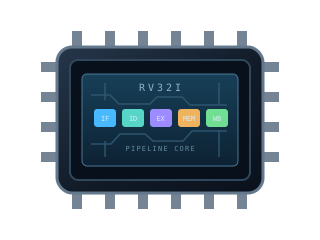
The lab models an in-order pipeline. Multiple instructions can occupy different stages during the same cycle; one click on Step cycle advances the whole pipeline, rather than completing one instruction.
| Stage | Operation |
|---|---|
| IF · Instruction fetch | Fetch the instruction at the current program counter. |
| ID · Decode | Decode the instruction and read its source registers. |
| EX · Execute | Compute an arithmetic result, address, or branch decision. |
| MEM · Memory | Read or write data memory, including modeled cache delays. |
| WB · Writeback | Commit the instruction's result to its destination register. |
Filling and draining the pipeline takes cycles. The displayed cycles per instruction (CPI) is total cycles divided by retired instructions, so short programs include a noticeable startup and drain cost. A stall adds time without retiring an additional instruction.
Forwarding and load-use hazards
A data dependency occurs when an instruction needs a value produced by an earlier instruction. The lab forwards available results from later pipeline stages so dependent arithmetic can proceed without waiting for every value to reach the register file.
Paste this example into the editor and assemble it. Step through the two dependent arithmetic instructions, then inspect t1 and t2 after writeback.
li   t0, 7
addi t1, t0, 5
add  t2, t1, t0
halt
The final values are t1 = 12 and t2 = 19. Forwarding changes when a value is available to a dependent instruction, while preserving the program's result.
A load-use dependency needs a different response: the next instruction requires memory data that is not yet ready. This example inserts one data-hazard bubble. Turn off Data cache to observe that bubble without an additional cache-miss delay.
li   t0, 19
sw   t0, 0(zero)
lw   t1, 0(zero)
addi t2, t1, 1
halt
The result is t2 = 20. Watch the load move through MEM and the dependent instruction wait before entering EX. The stall preserves correctness instead of letting the dependent instruction use an old register value.
Branch prediction and cache timing
The lab offers static not-taken prediction and an adaptive predictor with two-bit saturating counters. When a branch resolves differently from its prediction, the pipeline flushes younger instructions from the wrong path and redirects fetching.
Run the Branch predictor sample to completion with each predictor mode. Compare prediction accuracy, flushes, cycle count, and CPI. Changing the predictor resets execution, giving each run a fresh starting state.
The direct-mapped data cache has eight lines of sixteen bytes each. A first access to a block misses; later accesses to its cached block can hit. Blocks that map to the same line can replace one another. Writes update both the cached line and data memory.
Run Array sum with Data cache enabled and disabled to compare the modeled timing. Disabling the cache uses direct memory accesses in this lab. These measurements describe this simulator's timing model, rather than a benchmark for a physical processor.
Assembler and verification
I implemented a two-pass assembler that resolves labels, expands supported pseudo-instructions, and emits RV32I machine-code words. Source mapping connects expanded instructions back to the editor. For example, a large li immediate can expand into more than one instruction.
The repository tests compare the pipeline's final registers and memory with an independent sequential reference model. They cover the included samples, generated dependency programs, instruction encodings, forwarding, branch flushes, cache behavior, and invalid memory accesses. This catches differences in architectural results even when the execution paths differ.
Read the simulator and assembler source and the CPU regression tests. The official RV32I specification describes the instruction set; the five-stage timing model is my implementation choice.
Scope and limitations
This is an educational browser model for supported RV32I integer instructions. Memory operations use the word instructions lw and sw. The lab provides 4 KiB of data memory and checks word alignment and memory bounds. It is not a complete operating-system environment: the lab does not model privileged execution, virtual memory, a full peripheral system, or every RISC-V extension. The halt pseudo-instruction ends the sample programs.